Directs all graphics requests to an Fl_Image. More...
#include <Fl_Image_Surface.H>
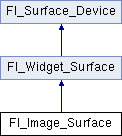
Public Member Functions | |
| Fl_Image_Surface (int w, int h, int high_res=0, Fl_Offscreen off=0) | |
| Constructor with optional high resolution. More... | |
| Fl_Shared_Image * | highres_image () |
| Returns a possibly high resolution image made of all drawings sent to the Fl_Image_Surface object. More... | |
| Fl_RGB_Image * | image () |
Returns an image made of all drawings sent to the Fl_Image_Surface object.More... | |
| virtual bool | is_current () |
| Is this surface the current drawing surface? | |
| Fl_Offscreen | offscreen () |
| Returns the Fl_Offscreen object associated to the image surface. More... | |
| void | origin (int *x, int *y) |
| Computes the coordinates of the current origin of graphics functions. More... | |
| void | origin (int x, int y) |
| Sets the position of the origin of graphics in the drawable part of the drawing surface. More... | |
| int | printable_rect (int *w, int *h) |
| Computes the width and height of the drawable area of the drawing surface. More... | |
| void | rescale () |
| Adapts the Fl_Image_Surface object to the new value of the GUI scale factor. More... | |
| void | set_current () |
| Make this surface the current drawing surface. More... | |
| ~Fl_Image_Surface () | |
| The destructor. More... | |
 Public Member Functions inherited from Fl_Widget_Surface Public Member Functions inherited from Fl_Widget_Surface | |
| void | draw (Fl_Widget *widget, int delta_x=0, int delta_y=0) |
| Draws the widget on the drawing surface. More... | |
| virtual void | draw_decorated_window (Fl_Window *win, int x_offset=0, int y_offset=0) |
| Draws a window with its title bar and frame if any. More... | |
| void | print_window_part (Fl_Window *win, int x, int y, int w, int h, int delta_x=0, int delta_y=0) |
| Draws a rectangular part of an on-screen window. More... | |
| Public Member Functions inherited from Fl_Surface_Device | |
| Fl_Graphics_Driver * | driver () |
| Returns the graphics driver of this drawing surface. More... | |
| virtual | ~Fl_Surface_Device () |
| The destructor. More... | |
Protected Member Functions | |
| void | translate (int x, int y) |
| Translates the current graphics origin accounting for the current rotation. More... | |
| void | untranslate () |
| Undoes the effect of a previous translate() call. | |
| Protected Member Functions inherited from Fl_Widget_Surface | |
| Fl_Widget_Surface (Fl_Graphics_Driver *d) | |
| The constructor. More... | |
| Protected Member Functions inherited from Fl_Surface_Device | |
| void | driver (Fl_Graphics_Driver *graphics_driver) |
| Sets the graphics driver of this drawing surface. More... | |
| virtual void | end_current () |
| Fl_Surface_Device (Fl_Graphics_Driver *graphics_driver) | |
| Constructor that sets the graphics driver to use for the created surface. More... | |
Friends | |
| class | Fl_Graphics_Driver |
Additional Inherited Members | |
| Static Public Member Functions inherited from Fl_Surface_Device | |
| static Fl_Surface_Device * | pop_current () |
| Removes the top element from the current drawing surface stack, and makes the new top element current. More... | |
| static void | push_current (Fl_Surface_Device *new_current) |
Pushes new_current on top of the stack of current drawing surfaces, and makes it current. More... | |
| static Fl_Surface_Device * | surface () |
| The current drawing surface. More... | |
| Protected Attributes inherited from Fl_Widget_Surface | |
| int | x_offset |
| horizontal offset to the origin of graphics coordinates | |
| int | y_offset |
| vertical offset to the origin of graphics coordinates | |
Detailed Description
Directs all graphics requests to an Fl_Image.
After creation of an Fl_Image_Surface object, make it the current drawing surface calling Fl_Surface_Device::push_current(), and all subsequent graphics requests will be recorded in the image. It's possible to draw widgets (using Fl_Image_Surface::draw()) or to use any of the Drawing functions or the Color & Font functions. Finally, call image() on the object to obtain a newly allocated Fl_RGB_Image object. Fl_Gl_Window objects can be drawn in the image as well.
Usage example:
Constructor & Destructor Documentation
◆ Fl_Image_Surface()
| Fl_Image_Surface::Fl_Image_Surface | ( | int | w, |
| int | h, | ||
| int | high_res = 0, |
||
| Fl_Offscreen | off = 0 |
||
| ) |
Constructor with optional high resolution.
- Parameters
-
w and h set the size of the resulting image. The value of the high_resparameter controls whetherwandhare interpreted as pixel or FLTK units.high_res If zero, the created image surface is sized at wxhpixels. If non-zero, the pixel size of the created image surface depends on the value of the display scale factor (see Fl_Graphics_Driver::scale()): the resulting image has the same number of pixels as an area of the display of sizewxhexpressed in FLTK units.off If not null, the image surface is constructed around a pre-existing Fl_Offscreen. The caller is responsible for both construction and destruction of this Fl_Offscreen object. Is mostly intended for internal use by FLTK.
- Version
- 1.3.4 (1.3.3 without the
highresparameter)
◆ ~Fl_Image_Surface()
| Fl_Image_Surface::~Fl_Image_Surface | ( | ) |
The destructor.
Member Function Documentation
◆ highres_image()
| Fl_Shared_Image * Fl_Image_Surface::highres_image | ( | ) |
Returns a possibly high resolution image made of all drawings sent to the Fl_Image_Surface object.
The Fl_Image_Surface object should have been constructed with Fl_Image_Surface(W, H, 1). The returned Fl_Shared_Image object is scaled to a size of WxH FLTK units and may have a pixel size larger than these values. The returned object should be deallocated with Fl_Shared_Image::release() after use.
- Deprecated:
- Use image() instead.
- Version
- 1.4 (1.3.4 for MacOS platform only)
◆ image()
| Fl_RGB_Image * Fl_Image_Surface::image | ( | ) |
Returns an image made of all drawings sent to the Fl_Image_Surface object.
The returned object contains its own copy of the RGB data. The caller is responsible for deleting the image.
◆ offscreen()
| Fl_Offscreen Fl_Image_Surface::offscreen | ( | ) |
Returns the Fl_Offscreen object associated to the image surface.
The returned Fl_Offscreen object is deleted when the Fl_Image_Surface object is deleted, unless the Fl_Image_Surface was constructed with non-null Fl_Offscreen argument.
◆ origin() [1/2]
|
virtual |
Computes the coordinates of the current origin of graphics functions.
- Parameters
-
[out] x,y If non-null, *x and *y are set to the horizontal and vertical coordinates of the graphics origin.
Reimplemented from Fl_Widget_Surface.
◆ origin() [2/2]
|
virtual |
Sets the position of the origin of graphics in the drawable part of the drawing surface.
Arguments should be expressed relatively to the result of a previous printable_rect() call. That is, printable_rect(&w, &h); origin(w/2, 0); sets the graphics origin at the top center of the drawable area. Successive origin() calls don't combine their effects. Origin() calls are not affected by rotate() calls (for classes derived from Fl_Paged_Device).
- Parameters
-
[in] x,y Horizontal and vertical positions in the drawing surface of the desired origin of graphics.
Reimplemented from Fl_Widget_Surface.
◆ printable_rect()
|
virtual |
Computes the width and height of the drawable area of the drawing surface.
Values are in the same unit as that used by FLTK drawing functions and are unchanged by calls to origin(). If the object is derived from class Fl_Paged_Device, values account for the user-selected paper type and print orientation and are changed by scale() calls.
- Returns
- 0 if OK, non-zero if any error
Reimplemented from Fl_Widget_Surface.
◆ rescale()
| void Fl_Image_Surface::rescale | ( | ) |
Adapts the Fl_Image_Surface object to the new value of the GUI scale factor.
The Fl_Image_Surface object must not be the current drawing surface. This function is useful only for an object constructed with non-zero high_res parameter.
- Version
- 1.4
◆ set_current()
|
virtual |
Make this surface the current drawing surface.
This surface will receive all future graphics requests. Starting from FLTK 1.4.0, another convenient API to set/unset the current drawing surface is Fl_Surface_Device::push_current( ) / Fl_Surface_Device::pop_current().
Reimplemented from Fl_Surface_Device.
◆ translate()
|
protectedvirtual |
Translates the current graphics origin accounting for the current rotation.
Each translate() call must be matched by an untranslate() call. Successive translate() calls add up their effects.
Reimplemented from Fl_Widget_Surface.
The documentation for this class was generated from the following files:
- Fl_Image_Surface.H
- Fl_Image_Surface.cxx
