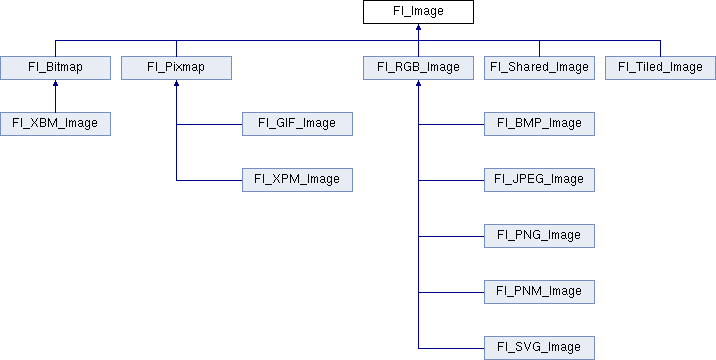
Base class for image caching, scaling and drawing. More...
#include <Fl_Image.H>
Public Member Functions | |
| virtual class Fl_Shared_Image * | as_shared_image () |
| Returns whether an image is an Fl_Shared_Image or not. More... | |
| virtual void | color_average (Fl_Color c, float i) |
| The color_average() method averages the colors in the image with the FLTK color value c. More... | |
| virtual Fl_Image * | copy (int W, int H) |
| Creates a resized copy of the specified image. More... | |
| Fl_Image * | copy () |
| Creates a copy of the specified image. More... | |
| int | count () const |
| The count() method returns the number of data values associated with the image. More... | |
| int | d () const |
| Returns the image depth. More... | |
| const char *const * | data () const |
| Returns a pointer to the current image data array. More... | |
| int | data_h () const |
| Returns the height of the image data. | |
| int | data_w () const |
| Returns the width of the image data. | |
| virtual void | desaturate () |
| The desaturate() method converts an image to grayscale. More... | |
| virtual void | draw (int X, int Y, int W, int H, int cx=0, int cy=0) |
| Draws the image to the current drawing surface with a bounding box. More... | |
| void | draw (int X, int Y) |
| Draws the image to the current drawing surface. More... | |
| int | fail () |
| Returns a value that is not 0 if there is currently no image available. More... | |
| Fl_Image (int W, int H, int D) | |
| The constructor creates an empty image with the specified width, height, and depth. More... | |
| int | h () const |
| Returns the current image drawing height in FLTK units. More... | |
| void | inactive () |
| The inactive() method calls color_average(FL_BACKGROUND_COLOR, 0.33f) to produce an image that appears grayed out. More... | |
| virtual void | label (Fl_Widget *w) |
| The label() methods are an obsolete way to set the image attribute of a widget or menu item. More... | |
| virtual void | label (Fl_Menu_Item *m) |
| The label() methods are an obsolete way to set the image attribute of a widget or menu item. More... | |
| int | ld () const |
| Returns the current line data size in bytes. More... | |
| virtual void | release () |
Releases an Fl_Image - the same as 'delete this'. More... | |
| virtual void | scale (int width, int height, int proportional=1, int can_expand=0) |
| Sets the drawing size of the image. More... | |
| virtual void | uncache () |
| If the image has been cached for display, delete the cache data. More... | |
| int | w () const |
| Returns the current image drawing width in FLTK units. More... | |
| virtual | ~Fl_Image () |
| The destructor is a virtual method that frees all memory used by the image. | |
Static Public Member Functions | |
| static Fl_Labeltype | define_FL_IMAGE_LABEL () |
| static void | RGB_scaling (Fl_RGB_Scaling) |
| Sets the RGB image scaling method used for copy(int, int). More... | |
| static Fl_RGB_Scaling | RGB_scaling () |
| Returns the currently used RGB image scaling method. More... | |
| static void | scaling_algorithm (Fl_RGB_Scaling algorithm) |
| Sets what algorithm is used when resizing a source image to draw it. More... | |
| static Fl_RGB_Scaling | scaling_algorithm () |
| Gets what algorithm is used when resizing a source image to draw it. More... | |
Static Public Attributes | |
| static const int | ERR_FILE_ACCESS = -2 |
| static const int | ERR_FORMAT = -3 |
| static const int | ERR_NO_IMAGE = -1 |
| static bool | register_images_done = false |
| True after fl_register_images() was called, false before. | |
Protected Member Functions | |
| void | d (int D) |
| Sets the current image depth. | |
| void | data (const char *const *p, int c) |
| Sets the current array pointer and count of pointers in the array. | |
| void | draw_empty (int X, int Y) |
| The protected method draw_empty() draws a box with an X in it. More... | |
| int | draw_scaled (int X, int Y, int W, int H) |
| Draw the image to the current drawing surface rescaled to a given width and height. More... | |
| void | h (int H) |
| Sets the height of the image data. More... | |
| void | ld (int LD) |
| Sets the current line data size in bytes. More... | |
| void | w (int W) |
| Sets the width of the image data. More... | |
Static Protected Member Functions | |
| static void | labeltype (const Fl_Label *lo, int lx, int ly, int lw, int lh, Fl_Align la) |
| static void | measure (const Fl_Label *lo, int &lw, int &lh) |
Friends | |
| class | Fl_Graphics_Driver |
Detailed Description
Base class for image caching, scaling and drawing.
Fl_Image is the base class used for caching, scaling and drawing all kinds of images in FLTK. This class keeps track of common image data such as the pixels, colormap, width, height, and depth. Virtual methods are used to provide type-specific image handling.
Each image possesses two (width, height) pairs. 1) The width and height of the image raw data are returned by data_w() and data_h(). These values are set when the image is created and remain unchanged. 2) The width and height of the area filled by the image when it gets drawn are returned by w() and h(). The values are equal to data_w() and data_h() when the image is created, and can be changed by the scale() member function.
Since the Fl_Image class does not support image drawing by itself, calling the draw() method results in a box with an X in it being drawn instead.
Constructor & Destructor Documentation
◆ Fl_Image()
| Fl_Image::Fl_Image | ( | int | W, |
| int | H, | ||
| int | D | ||
| ) |
The constructor creates an empty image with the specified width, height, and depth.
The width and height are in pixels. The depth is 0 for bitmaps, 1 for pixmap (colormap) images, and 1 to 4 for color images.
Member Function Documentation
◆ as_shared_image()
|
inlinevirtual |
Returns whether an image is an Fl_Shared_Image or not.
This virtual method returns a pointer to an Fl_Shared_Image if this object is an instance of Fl_Shared_Image or NULL if not. This can be used to detect if a given Fl_Image object is a shared image, i.e. derived from Fl_Shared_Image.
- Since
- 1.4.0
Reimplemented in Fl_Shared_Image.
◆ color_average()
|
virtual |
The color_average() method averages the colors in the image with the FLTK color value c.
The i argument specifies the amount of the original image to combine with the color, so a value of 1.0 results in no color blend, and a value of 0.0 results in a constant image of the specified color.
An internal copy is made of the original image before changes are applied, to avoid modifying the original image.
Reimplemented in Fl_RGB_Image, Fl_SVG_Image, Fl_Shared_Image, Fl_Pixmap, and Fl_Tiled_Image.
◆ copy() [1/2]
|
virtual |
Creates a resized copy of the specified image.
The image should be deleted (or in the case of Fl_Shared_Image, released) when you are done with it.
- Parameters
-
W,H width and height of the returned copied image
Reimplemented in Fl_RGB_Image, Fl_SVG_Image, Fl_Shared_Image, Fl_Pixmap, Fl_Bitmap, and Fl_Tiled_Image.
◆ copy() [2/2]
|
inline |
Creates a copy of the specified image.
The image should be deleted (or in the case of Fl_Shared_Image, released) when you are done with it.
◆ count()
|
inline |
The count() method returns the number of data values associated with the image.
The value will be 0 for images with no associated data, 1 for bitmap and color images, and greater than 2 for pixmap images.
◆ d()
|
inline |
Returns the image depth.
The return value will be 0 for bitmaps, 1 for pixmaps, and 1 to 4 for color images.
◆ data()
|
inline |
Returns a pointer to the current image data array.
Use the count() method to find the size of the data array.
◆ desaturate()
|
virtual |
The desaturate() method converts an image to grayscale.
If the image contains an alpha channel (depth = 4), the alpha channel is preserved.
An internal copy is made of the original image before changes are applied, to avoid modifying the original image.
Reimplemented in Fl_RGB_Image, Fl_SVG_Image, Fl_Shared_Image, Fl_Pixmap, and Fl_Tiled_Image.
◆ draw() [1/2]
|
virtual |
Draws the image to the current drawing surface with a bounding box.
Arguments X,Y,W,H specify a bounding box for the image, with the origin (upper-left corner) of the image offset by the cx and cy arguments.
In other words: fl_push_clip(X,Y,W,H) is applied, the image is drawn with its upper-left corner at X-cx,Y-cy and its own width and height, fl_pop_clip() is applied.
Reimplemented in Fl_RGB_Image, Fl_SVG_Image, Fl_Shared_Image, Fl_Pixmap, Fl_Bitmap, and Fl_Tiled_Image.
◆ draw() [2/2]
|
inline |
Draws the image to the current drawing surface.
- Parameters
-
X,Y specify the upper-lefthand corner of the image.
◆ draw_empty()
|
protected |
The protected method draw_empty() draws a box with an X in it.
It can be used to draw any image that lacks image data.
◆ draw_scaled()
|
protected |
Draw the image to the current drawing surface rescaled to a given width and height.
Intended for internal use by the FLTK library.
- Parameters
-
X,Y position of the image's top-left W,H width and height for the drawn image
- Returns
- 1
- Deprecated:
- Only for API compatibility with FLTK 1.3.4.
◆ fail()
| int Fl_Image::fail | ( | ) |
Returns a value that is not 0 if there is currently no image available.
Example use:
- Returns
- ERR_NO_IMAGE if no image was found
- ERR_FILE_ACCESS if there was a file access related error (errno should be set)
- ERR_FORMAT if image decoding failed.
◆ h() [1/2]
|
inlineprotected |
◆ h() [2/2]
|
inline |
◆ inactive()
|
inline |
The inactive() method calls color_average(FL_BACKGROUND_COLOR, 0.33f) to produce an image that appears grayed out.
An internal copy is made of the original image before changes are applied, to avoid modifying the original image.
◆ label() [1/2]
|
virtual |
The label() methods are an obsolete way to set the image attribute of a widget or menu item.
Use the image() or deimage() methods of the Fl_Widget and Fl_Menu_Item classes instead.
Reimplemented in Fl_RGB_Image, Fl_Pixmap, and Fl_Bitmap.
◆ label() [2/2]
|
virtual |
The label() methods are an obsolete way to set the image attribute of a widget or menu item.
Use the image() or deimage() methods of the Fl_Widget and Fl_Menu_Item classes instead.
Reimplemented in Fl_RGB_Image, Fl_Pixmap, and Fl_Bitmap.
◆ ld() [1/2]
|
inlineprotected |
Sets the current line data size in bytes.
Color images may contain extra data that is included after every line of color image data and is normally not present.
If LD is zero, then line data size is assumed to be w() * d() bytes.
If LD is non-zero, then it must be positive and larger than w() * d() to account for the extra data per line.
◆ ld() [2/2]
|
inline |
Returns the current line data size in bytes.
- See also
- ld(int)
◆ release()
|
inlinevirtual |
Releases an Fl_Image - the same as 'delete this'.
This virtual method is for almost all image classes the same as calling
where image is an Fl_Image * pointer.
However, for subclass Fl_Shared_Image this virtual method is reimplemented and maintains shared images.
This virtual method makes it possible to delete all image types in the same way by calling
Reasoning: If you have an 'Fl_Image *' pointer and don't know if the object is one of the class Fl_Shared_Image or any other subclass of Fl_Image (for instance Fl_RGB_Image) then you can't just use operator delete since this is not appropriate for Fl_Shared_Image objects.
The virtual method release() handles this properly.
- Since
- 1.4.0 in the base class Fl_Image and virtual in Fl_Shared_Image
Reimplemented in Fl_Shared_Image.
◆ RGB_scaling() [1/2]
|
static |
Sets the RGB image scaling method used for copy(int, int).
Applies to all RGB images, defaults to FL_RGB_SCALING_NEAREST.
◆ RGB_scaling() [2/2]
|
static |
Returns the currently used RGB image scaling method.
◆ scale()
|
virtual |
Sets the drawing size of the image.
This function controls the values returned by member functions w() and h() which in turn control how the image is drawn: the full image data (whose size is given by data_w() and data_h()) are drawn scaled to an area of the drawing surface sized at w() x h() FLTK units. This can make a difference if the drawing surface has more than 1 pixel per FLTK unit because the image can be drawn at the full resolution of the drawing surface. Examples of such drawing surfaces: HiDPI displays, laser printers, PostScript files, PDF printers.
- Parameters
-
width,height maximum values, in FLTK units, that w() and h() should return proportional if not null, keep the values returned by w() and h() proportional to data_w() and data_h() can_expand if null, the values returned by w() and h() will not be larger than data_w() and data_h(), respectively
- Note
- This function generally changes the values returned by the w() and h() member functions. In contrast, the values returned by data_w() and data_h() remain unchanged.
- Version
- 1.4 (1.3.4 and FL_ABI_VERSION for Fl_Shared_Image only)
Example code: scale an image to fit in a box
◆ scaling_algorithm() [1/2]
|
inlinestatic |
Sets what algorithm is used when resizing a source image to draw it.
The default algorithm is FL_RGB_SCALING_BILINEAR. Drawing an Fl_Image is sometimes performed by first resizing the source image and then drawing the resized copy. This occurs, e.g., when drawing to screen under X11 without Xrender support after having called scale(). This function controls what method is used when the image to be resized is an Fl_RGB_Image.
- Version
- 1.4
◆ scaling_algorithm() [2/2]
|
inlinestatic |
Gets what algorithm is used when resizing a source image to draw it.
◆ uncache()
|
virtual |
If the image has been cached for display, delete the cache data.
This allows you to change the data used for the image and then redraw it without recreating an image object.
Reimplemented in Fl_RGB_Image, Fl_Shared_Image, Fl_Pixmap, and Fl_Bitmap.
◆ w() [1/2]
|
inlineprotected |
◆ w() [2/2]
|
inline |
The documentation for this class was generated from the following files:
- Fl_Image.H
- Fl_Image.cxx
